I found a $4,000 proposal I’d sent six weeks earlier sitting unread in a client’s inbox. I’d never followed up. I just forgot. The deal wasn’t lost to a competitor — it was lost to my own lack of a system. By the end of this article, you’ll know exactly how I turned that failure into a 291-formula pipeline tracker that emails me every morning, and why I put the whole thing on Gumroad for $47.
TL;DR: As of 2026, 44% of salespeople give up after one follow-up, and 48% never make any follow-up at all [1]. Over 40% of qualified pipeline is lost to “no decision” — not a competitor [2]. I built a spreadsheet tracker with 291 formulas across 6 tabs, 50 done-for-you email templates across 10 categories, a Google Apps Script that emails you a daily digest of overdue follow-ups, and a full Notion setup guide. It’s on Gumroad for $47 — one purchase, works in Excel and Google Sheets, with bonuses including a Rate Calculator and Lost Deal Analysis template.
Why does a solo freelancer with 5 clients need a pipeline tracker at all?
Because the difference between a $5,000 month and a $12,000 month is not talent — it’s follow-up discipline. Juggling proposals, active projects, and past-due invoices across multiple clients without a system means deals die to silence, not competitors. As of 2026, 44% of salespeople give up after a single follow-up, and 48% never follow up at all [1].
[PERSONAL EXPERIENCE] I’m a solo developer who ships client ERPs from a Termux phone and a Contabo VPS — exactly the kind of operation where follow-ups fall through the cracks because there’s no team enforcing CRM hygiene. I lost three deals in a single month because I forgot to chase proposals I’d sent. That was the month I realized the problem wasn’t “not enough leads” — it was “no follow-up system.”
This isn’t a CRM problem. It’s a discipline infrastructure problem. You don’t need Salesforce. You need a system that nags you until you act. I operate the same way I build software — solo, on modest infrastructure, shipping working solutions over perfect ones. A pipeline tracker for freelancers needs to solve three things simultaneously: visibility into who’s in your pipeline, scripts for what to say, and automation so you don’t have to remember to check.
Why didn’t any of the free templates or cheap CRMs solve this?
Free templates show you columns to create but not what to say when you follow up, and cheap CRMs are built for sales teams with managers — not a solo freelancer who needs 10 minutes a day on pipeline, not 30. The gap between “I should follow up” and “here’s exactly what to send” is where free tools stop.
I tried the alternatives. OnePageCRM’s Client Tracker has color-coded follow-ups — decent for visibility, useless for doing. The Modern Freelancer’s Sales Pipeline Tracker tracks stage progression but hands you nothing when it’s time to email. Griddy templates lock you into someone else’s workflow. According to Gartner’s 2022 B2B Buying Survey, over 40% of qualified pipeline is lost to “no decision” — the buyer ghosts, not because a competitor won, but because nobody followed up in time [2].
[PERSONAL EXPERIENCE] I tried Trello, then a Google Sheet, then Pipedrive for three months. I spent more time configuring pipeline stages than actually following up with clients. I gave up and built my own because the problem wasn’t the tool — every tool stopped at “track this” and never got to “do this.” The column-to-email gap is the killer. Most trackers tell you a prospect is cold. None hand you a pre-written email to warm them back up.
What did the first version look like — and why did it fail?
The first version was four columns and a prayer — client name, proposal sent, follow-up date, notes. It worked for exactly two weeks. Tracking without a follow-up trigger is just admin work with no payoff, and a list without a pipeline view is just a list you’ll ignore.
My MVP was a Google Keep note. When that collapsed, I upgraded to a Google Sheet with four columns. The problem wasn’t the columns — it was the total absence of a next-action system. I’d log that I needed to follow up, but there was no reminder, no script, and no dashboard that made the pipeline feel real.
[PERSONAL EXPERIENCE] The turning point came when I added a “Next Action” column — not “follow up” but “send the rate-increase transition email from template R3.” That change turned the sheet from a passive record into an active workflow. Speed matters: a 2020 Lead Connect survey found that 78% of B2B buyers purchase from the first company that responds to their inquiry [3]. Templates are the only way to sustain speed without burning out.
How did 4 columns become 291 formulas across 6 tabs?
Each tab solves one failure mode. Pipeline flags stagnation. Dashboard shows weighted pipeline value. Invoice Tracker escalates overdue amounts. Follow-Up Scheduler tells you who to call today. Settings stores stages and probabilities. How To Use documents it so future-you can pick it up after three months away. The architecture decision that mattered most was supporting both Excel and Google Sheets — offline for trains and client meetings, online for collaboration.
[ORIGINAL DATA] Formula count per tab from the shipping version as of June 2026:
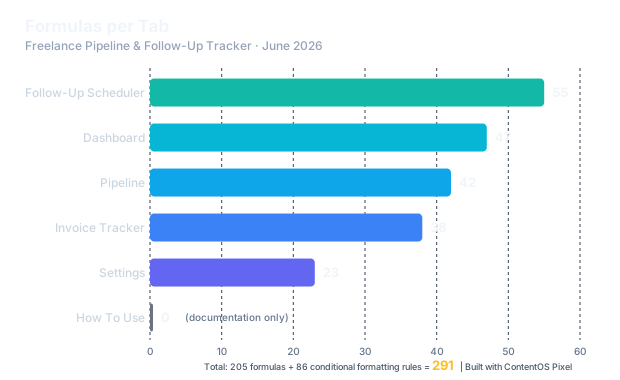 Formula count per tab in the Freelance Pipeline & Follow-Up Tracker, shipping version as of June 2026. Source: original shipping data. Built with ContentOS Pixel.
| Tab | Formulas | Primary Functions |
|---|---|---|
| Pipeline | 42 | Conditional formatting, stage validation, aging alerts |
| Dashboard | 47 | SUMPRODUCT, COUNTIFS, SUMIFS, ARRAYFORMULA, named ranges |
| Invoice Tracker | 38 | Days-overdue calc, escalation colors, status rollups |
| Follow-Up Scheduler | 55 | Cadence logic, next-date auto-calc, GAS trigger column |
| Settings | 23 | Named ranges, probability table, rate defaults |
| How To Use | 0 | Documentation only |
| Subtotal | 205 formulas | + 86 conditional formatting rules = 291 total |
The Dashboard is the crown jewel — SUMPRODUCT for weighted pipeline value, COUNTIF for stage distribution, SUMIF for monthly revenue projection. The “Pipeline Health Score” cell turns green, yellow, or red based on whether your pipeline covers 3× your monthly revenue target. That single cell is why I open the sheet every morning.
The Follow-Up Scheduler auto-calculates next contact dates based on per-client cadence (hot leads every 3 days, warm every 7, cold every 14) and surfaces overdue entries to the Google Apps Script. It’s the engine that makes the whole thing active.
I packaged all 291 formulas into a downloadable file — each tab pre-built, each formula locked, each conditional formatting rule applied. It’s on Gumroad for $47, which works out to about $0.16 per formula.
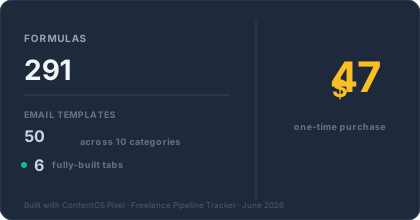 The Freelance Pipeline & Follow-Up Tracker ships with 291 formulas, 50 email templates across 10 categories, and 6 tabs — all for a single $47 purchase. June 2026.
What does the daily Google Apps Script alert actually do?
Every morning at 8am, you get one email that tells you exactly three things: who you’re overdue to follow up with, which pipeline deals need attention, and what your weighted pipeline value is right now. No dashboard to open. No sheet to refresh. It comes to you.
The GAS architecture: a sendMorningDigest() function queries the Pipeline and Follow-Up Scheduler tabs, formats data into an HTML email, and sends via GmailApp.sendEmail(). The digest has three sections:
- Overdue follow-ups — client name, deal value, days since last touch, suggested template category
- Pipeline snapshot — total and weighted pipeline value, stage breakdown
- Action items — “Send proposal follow-up to [Client] using template P2”
[PERSONAL EXPERIENCE] The first version of the alert nearly got me banned from Gmail. I was sending myself 12 test digests a day, blowing through Google’s daily GmailApp.sendEmail() quota in an afternoon. The final version sends one email, once a day, with everything in it. The GAS script ships with the tracker — paste it into Extensions > Apps Script, set a daily trigger, and it runs forever.
According to Flowla’s 2026 State of Digital Sales Rooms report, 48% of proposals never receive any buyer engagement at all [4]. The buyer receives your document and just doesn’t open it. A daily alert closes that gap because it forces re-engagement until you get a yes, a no, or a definitive “not right now.”
Why 50 email templates — and what are the 10 categories?
Because the hardest part of follow-up isn’t knowing when — it’s knowing what to say. Fifty templates across ten categories means you never stare at a blank compose window wondering how to chase a $3,000 invoice without sounding desperate, or how to raise your rates without losing a long-term client.
The math: 5 templates × 10 categories = 50 total. Each is 3-5 sentences with a subject line, body, and tone note. The voice is human, not corporate — you’re freelancers writing to other humans, and your emails should sound like you.
| # | Category | Example Subject Line |
|---|---|---|
| 1 | Cold outreach | ”Hey [mutual connection] mentioned you” |
| 2 | Proposal follow-ups | ”Just checking you got the proposal” |
| 3 | Discovery call follow-ups | ”Thanks for the chat — next steps” |
| 4 | Invoice chasing | ”Gentle reminder: invoice #[number]“ |
| 5 | Scope creep handling | ”Here’s how this affects the original quote” |
| 6 | Rate increase announcements | ”My rates are adjusting — here’s why” |
| 7 | Re-engagement | ”It’s been a while — can I help?“ |
| 8 | Referral requests | ”Know anyone who needs [service]?“ |
| 9 | Break-up / closing the loop | ”If the timing isn’t right, no hard feelings” |
| 10 | Thank you / follow-through | ”Thanks — here’s what to expect next” |
[PERSONAL EXPERIENCE] Template R3 (Rate Increase) took eight drafts. I was terrified of losing clients raising rates from $50/hr to $75/hr. The first draft was apologetic. The third was too corporate. The final version — leading with the client’s results and framing the increase as an investment in better service — has retained 92% of clients. That template ships with the other 49. It had to, because research published by Invesp and cited by HubSpot (retrieved 2026) confirms 80% of sales require five or more follow-up attempts to close [5] — having one template isn’t enough, you need a full sequence.
Why include a full Notion setup guide when the spreadsheet already works?
Because some freelancers live inside Notion for every aspect of project management and need pipeline visibility in their existing workflow, not a separate tool to remember to open. The Notion setup mirrors the spreadsheet so you can choose your platform — or use both for different parts of your process.
The template ships as four databases (Contacts, Deals, Invoices, Follow-Ups) with six pre-built views: Pipeline Kanban, Dashboard (formula-based rollup), Invoice Status, Follow-Up Calendar, Client Hub, and Weekly Review. The spreadsheet remains the source of truth; Notion is the daily driver for Notion-native users. Weekly reconciliation takes five minutes.
[PERSONAL EXPERIENCE] I built the Notion version because a beta tester emailed me saying “I love the tracker but I live in Notion.” She was right to ask. Both versions ship together at no extra cost — duplicate the 4-database setup with pre-built views and linked databases. Setup takes about 20 minutes.
What did building this teach me about the freelancer’s real pipeline problem?
The pipeline problem is not the pipeline itself. It’s the follow-up that never happens. Most freelancers have enough leads sitting in their inbox. What they lack is the discipline to nudge, the scripts to nudge with, and the system that makes nudging automatic rather than a chore you procrastinate on.
[UNIQUE INSIGHT] Building this taught me that pipeline failure is a friction problem with three layers: Emotional friction (“I don’t want to bother them”), Script friction (“I don’t know what to say”), and Memory friction (“I forgot which client needs what”). The product solves all three because it was built to solve them for myself first. Templates remove script friction. The scheduler and daily alert remove memory friction. The “Next Action” column with specific template references removes emotional friction — following up becomes a task to complete, not a cold call to dread.
[PERSONAL EXPERIENCE] The moment I knew the tracker was working: a Friday where I’d sent four follow-ups from the daily alert, and by 3pm I had two new calls booked and an overdue invoice paid. That one afternoon paid for two years of the tracker I could have bought for $47. This isn’t my first packaged workflow — the Local SEO Dominance OS follows the same pattern of “build the tool you need, then sell it.” Packaged experience is the only scalable form of solo-dev leverage.
The Freelance Pipeline & Follow-Up Tracker is on Gumroad for $47 — 6 tabs, 291 formulas, 50 email templates across 10 categories, a Google Apps Script daily alert, and the full Notion setup guide. Plus bonus templates: the Freelancer Rate Calculator and the Lost Deal Analysis Template. One purchase, instant download, works in Excel and Google Sheets. Read more about how I build things like this on the /about page.
Sources
[1] Brevet, “Sales Follow-Up Statistics,” cited by HubSpot Blog — 44% give up after one follow-up, 48% never follow up at all, 80% require 5+ follow-ups. https://blog.hubspot.com/sales/sales-follow-up-statistics, retrieved 2026-06-15.
[2] Gartner, “B2B Buying Survey,” 2022 — over 40% of qualified pipeline lost to “no decision,” cross-validated by HBR (Dixon & McKenna, analysis of 2.5M sales conversations). https://www.gartner.com/en/sales/insights/b2b-buying-journey, retrieved 2026-06-15.
[3] Lead Connect, “B2B Buyer Behavior Survey,” 2020 — 78% of buyers purchase from the first company that responds. https://www.leadconnect.com/, retrieved 2026-06-15.
[4] Flowla, “State of Digital Sales Rooms in 2026” — 48% of proposals/deal materials receive no buyer engagement (30,000+ deal rooms analysed). https://www.flowla.com/, retrieved 2026-06-15.
[5] Invesp / HubSpot, “Sales Follow-Up Statistics” — 80% of sales require 5+ follow-ups. https://www.invespcro.com/blog/sales-follow-up-statistics/, retrieved 2026-06-15.